AUD
AUD
 USD
USD
 NZD
NZD
 GBP
GBP
 Euro
Euro

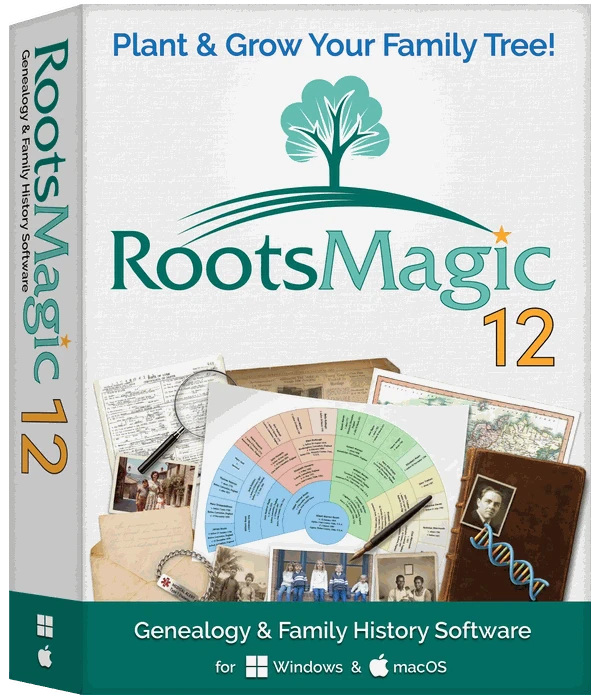

RootsMagic 12 (download)
RootsMagic
- SKU:
- FOS038
- Availability:
- Your licence code and download information will normally be emailed to you within 24 hours during weekdays.

Media: SOFTWARE - download
Year: 2026
Suitable for: PC & Mac
Publisher: RootsMagic

RootsMagic 12 is the latest version of this award-winning genealogy software. It helps you discover, document, and share your family history. It runs on Windows and Mac.
Click on the image below to learn more about RootsMagic 12.

What's New
Your family, on this day
The Home page lists the births, marriages, and deaths in your tree that happened on today’s date, and how each person is related. It also shows your tree at a glance and picks up where you left off.Simpler sources
18 source templates based on Evidence Explained (4th edition) replace the old list of more than 400, and templates you’ve already used keep working as your own. The citation editor is now organized into four tabs: Citation, Source Text, Quality, and Links. Free-form sources get direct fields for the footnote, short footnote, bibliography, and page.Add a source by typing
Type a source type, a full citation, a web address, or text from a source you’ve already entered, and SourceWizard suggests a match. A new source and its details now go on one screen. Not sure which template fits? “Help me choose” walks you through it.AI prompts for more than people
The AI Prompt Builder now makes prompts for people, families, places, sources, citations, and photos, and each one can include much more of your data, like notes and sources. Start with more than 20 built-in prompts, or write your own.Bow-tie charts and hourglass fan charts
Bow-tie charts and hourglass fan charts join the charts you already know. A bow-tie chart puts the father’s ancestors on one side and the mother’s on the other; an hourglass fan chart shows ancestors above and descendants below.Life Summary your way
Choose which Life Summary panels you see (events, spouses and children, parents and siblings) and put them in any order. Show lifespans for family members, and the spouse for family events.A new note editor
Live spell check as you type (see it), plus superscript, subscript, small caps, and strikethrough.Ten color themes
Five new color themes (Heritage, Wine, Olive, Indigo, and Slate) join the original five, for ten in all.


And much more
The same everywhere - Windows (32- and 64-bit) and Mac now have exactly the same features, including every import. One Windows installer puts the right version on your computer. And RootsMagic now imports Family Tree Maker files from version 3 through Family Tree Maker 2024.
Source template converter - Change a free-form source, and all its citations, to a template. Or turn a templated source back into free-form
More ways to save reports - Save reports as RTF, HTML, EPUB, or Markdown files, ready for word processors, websites, and e-readers.
Who was there? - The Who Was There list shows everyone in your tree who was in a particular place at a particular time, estimating life spans when dates are missing.
Powerful searches - Advanced Search combines rules with And, Or, and But Not, even following a Y-DNA or mitochondrial line, and saves the results as a group. Find Everywhere searches every kind of record at once.
Weigh the evidence - Rate each citation’s source, information, and evidence, and mark facts and relationships Proven, Disproven, Disputed, or Proposed. Share one census entry with the whole household, each with a role.
Places on the map - A gazetteer of 3.5 million places finds the coordinates for your places, and maps the events for a whole group of people at once.
Everything in one window - Work with people, places, sources, media, tasks, and more from one place. Can’t find a command? Type it in the Command Palett
Family health histories - Record health conditions to see family health trends. Print a family health history with the names replaced by “Private,” ready for a doctor.
New book
Many people barely touch the tip of the iceberg of RootsMagic’s features. If you are one of these people, Getting the Most Out of RootsMagic 12 is the book for you. You start with basic data entry and continue by learning advanced techniques such as custom reports, citing sources, research tasks, creating user-defined facts, powerful tools, and much more.


Click the image above for the product details
New Videos
To help users become familiar with the new version and features, RootsMagic has created a new set of free tutorial video Click here to for all RootsMagic 12 videos
Free “RootsMagic Essentials”
RootsMagic 12 is also available in a free edition called “RootsMagic 10 Essentials.” This version includes many core features and is perfect for those who are new to genealogy. Available for both Windows and macOS, RootsMagic Essentials offers a risk-free way to begin your family history journey. Download RootsMagic 12 Essentials.
Do you have a previous version of RootsMagic?
If so, check out the RootsMagic upgrade.
Available for both Windows and Mac
- Windows 10 or 11
- MacOS 12 (Monterey), 13 (Ventura), 14 (Sonoma), 15 (Sequoia), 26 (Tahoe), or 27 (Golden Gate)
When will I get my download version?
You can download to program now. This is the full program, but is restricted initially the funcitoanliy of the Essentials version. This can then be unlocked with the licence code which will be emailed to you, usually within 24 hours during weekdays.
Click on the image below to learn more about RootsMagic 12
A Clearer, More Comfortable Workspace
When you sit down to work on your family tree, you want information at your fingertips without having to guess what a button does. That’s why we’ve simplified the interface in RootsMagic 11. Views like Pedigree and Family are now labeled directly on the page, while cryptic icons have been replaced with menus that spell out your choices.
On the People page, a new side panel header shows the basics about a person immediately—names, vital events, relationships, even icons for notes, sources, media, and DNA. Switching between spouses or parent sets is just a click away, so you’ll always know where you are in the tree.
A Life Story at a Glance
Sometimes you don’t want to dig through multiple screens just to understand someone’s life. The new Life Summary panel gives you a complete snapshot—life events, spouses and children, parents and siblings—all in one place. You can expand or collapse sections, quickly add relatives, or rearrange children and spouses with simple drag-and-drop.
Think of it as your research dashboard: one page where you can see a person’s story unfold and take action without losing your place.
Better Editing
RootsMagic 11 makes editing smoother and more intuitive. If you’ve ever struggled to track down which event a citation belongs to, the new Sources view puts every citation for a person on one screen—no more hunting around. Notes and tasks work the same way: a single view shows them all, with quick indicators so you know exactly where information already exists.
This means less time clicking through windows and more time actually working with your data.
Better Searching
Searching is often where breakthroughs happen, and RootsMagic 11 gives you more powerful tools to zero in on the right people and facts. The Advanced Search has been redesigned so you can combine rules with AND, OR, or BUT NOT, search by multiple event fields, and even look for people without sources or those who aren’t linked into the tree.
When you find someone, the results now include a Life Summary so you don’t have to leave the search page to see the bigger picture. And because results can now be customized, printed or exported, you can take them with you into research sessions or share them with others.
Bringing AI Into Your Research
RootsMagic 11 introduces the AI Prompt Builder, a first in genealogy software. It helps you create clear, reusable prompts to use with the AI of your choice. Want to draft a life sketch, write an obituary, or get historical context for a person’s life? The AI Prompt Builder can structure the request for you, pulling in the details you want from your database while giving you options like “no fake info” or preferred output format.
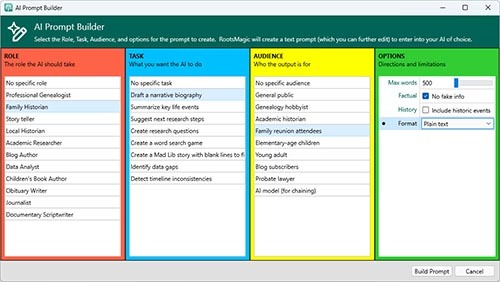
This isn’t AI doing the research for you—it’s a way to make AI work smarter for you, helping you write, summarize, and explore ideas more efficiently.
Reports, Proofs, and Beyond
We’ve also added practical improvements you’ve been asking for: print relationship charts for any calculated relationship, mark facts as “proposed” to capture theories without cluttering your proven research, and use new proof icons to track your confidence in each fact. The Explorer now incorporates the Life Summary panel, making navigation smoother than ever.
And under the hood, RootsMagic 11 brings full support for the latest Mac hardware, faster performance, and dozens of small enhancements that make daily use more pleasant.
Ready to Grow With You
RootsMagic 11 was built to help you do what you love most—discovering and telling your family story. Whether you’re analyzing sources, tidying up your notes, exploring DNA connections, or writing narratives with AI, this release gives you tools that fit naturally into the way you work.
Learn More
New Book
Many people barely touch the tip of the iceberg of RootsMagic’s features. If you are one of these people, “Getting the Most Out of RootsMagic 11” is the book for you. You start with basic data entry and continue by learning advanced techniques such as custom reports, citing sources, research tasks, creating user-defined facts, powerful tools, and much more.
New Videos
To help users become familiar with the new version and features, RootsMagic has created a new set of free tutorial videos, including “Getting Started with RootsMagic,” “What’s New in RootsMagic 11,” and shorter videos showing individual features in more depth. Watch videos at RootsMagicTV.com.
Free “RootsMagic Essentials”
RootsMagic 11 is also available in a free edition called “RootsMagic 10 Essentials.” This version includes many core features and is perfect for those who are new to genealogy. Available for both Windows and macOS, RootsMagic Essentials offers a risk-free way to begin your family history journey. Download RootsMagic 11 Essentials at https://rootsmagic.com/try.
Do you have a previous version of RootsMagic?
If so, check out the RootsMagic Upgrade options (below).
Available for both Windows and Mac
- Windows 10 or 11
- macOS 12 (Monterey), 13 (Ventura), 14 (Sonoma), 15 (Sequoia), or 26 (Tahoe)
All RootsMagic products
When will I get my download version?
Your licence code and download information will normally be emailed to you within 24 hours during weekdays.
Related Products
RootsMagic 12 (download)
Related Products