AUD
AUD
 USD
USD
 NZD
NZD
 GBP
GBP
 Euro
Euro



RootsMagic 11 (download)
RootsMagic
- SKU:
- FOS035
- Availability:
- Your licence code and download information will normally be emailed to you within 24 hours during weekdays.

Media: SOFTWARE - download
Year: 2025
Suitable for: PC & Mac
Publisher: RootsMagic
RootsMagic 11 is the latest version of this award-winning genealogy software. This release is more than just new buttons and menus—it’s about making your family history research easier, clearer, and more enjoyable. Every change we’ve made in RootsMagic 11 was inspired by user feedback, so you can spend less time wrestling with software and more time uncovering your story.
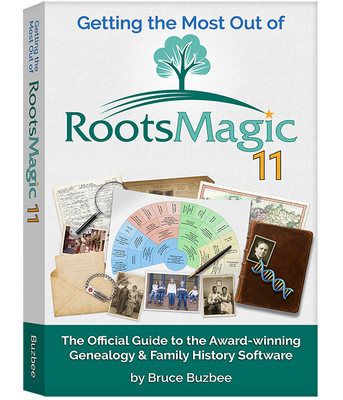
Click on the image below to learn more about RootsMagic 11.

A Clearer, More Comfortable Workspace
When you sit down to work on your family tree, you want information at your fingertips without having to guess what a button does. That’s why we’ve simplified the interface in RootsMagic 11. Views like Pedigree and Family are now labeled directly on the page, while cryptic icons have been replaced with menus that spell out your choices.
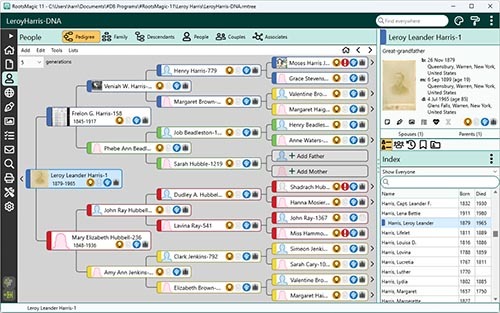
On the People page, a new side panel header shows the basics about a person immediately—names, vital events, relationships, even icons for notes, sources, media, and DNA. Switching between spouses or parent sets is just a click away, so you’ll always know where you are in the tree.
A Life Story at a Glance
Sometimes you don’t want to dig through multiple screens just to understand someone’s life. The new Life Summary panel gives you a complete snapshot—life events, spouses and children, parents and siblings—all in one place. You can expand or collapse sections, quickly add relatives, or rearrange children and spouses with simple drag-and-drop.
Think of it as your research dashboard: one page where you can see a person’s story unfold and take action without losing your place.
Better Editing
RootsMagic 11 makes editing smoother and more intuitive. If you’ve ever struggled to track down which event a citation belongs to, the new Sources view puts every citation for a person on one screen—no more hunting around. Notes and tasks work the same way: a single view shows them all, with quick indicators so you know exactly where information already exists.
This means less time clicking through windows and more time actually working with your data.
Better Searching
Searching is often where breakthroughs happen, and RootsMagic 11 gives you more powerful tools to zero in on the right people and facts. The Advanced Search has been redesigned so you can combine rules with AND, OR, or BUT NOT, search by multiple event fields, and even look for people without sources or those who aren’t linked into the tree.
When you find someone, the results now include a Life Summary so you don’t have to leave the search page to see the bigger picture. And because results can now be customized, printed or exported, you can take them with you into research sessions or share them with others.
Bringing AI Into Your Research
RootsMagic 11 introduces the AI Prompt Builder, a first in genealogy software. It helps you create clear, reusable prompts to use with the AI of your choice. Want to draft a life sketch, write an obituary, or get historical context for a person’s life? The AI Prompt Builder can structure the request for you, pulling in the details you want from your database while giving you options like “no fake info” or preferred output format.
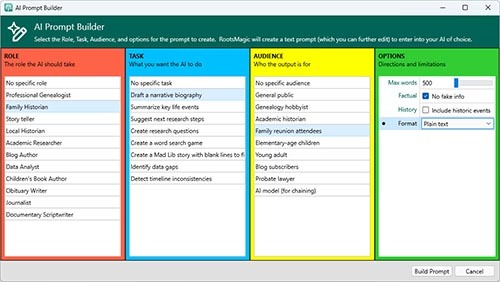
This isn’t AI doing the research for you—it’s a way to make AI work smarter for you, helping you write, summarize, and explore ideas more efficiently.
Reports, Proofs, and Beyond
We’ve also added practical improvements you’ve been asking for: print relationship charts for any calculated relationship, mark facts as “proposed” to capture theories without cluttering your proven research, and use new proof icons to track your confidence in each fact. The Explorer now incorporates the Life Summary panel, making navigation smoother than ever.
And under the hood, RootsMagic 11 brings full support for the latest Mac hardware, faster performance, and dozens of small enhancements that make daily use more pleasant.
Ready to Grow With You
RootsMagic 11 was built to help you do what you love most—discovering and telling your family story. Whether you’re analyzing sources, tidying up your notes, exploring DNA connections, or writing narratives with AI, this release gives you tools that fit naturally into the way you work.
Learn More
New Book
Many people barely touch the tip of the iceberg of RootsMagic’s features. If you are one of these people, “Getting the Most Out of RootsMagic 11” is the book for you. You start with basic data entry and continue by learning advanced techniques such as custom reports, citing sources, research tasks, creating user-defined facts, powerful tools, and much more.
New Videos
To help users become familiar with the new version and features, RootsMagic has created a new set of free tutorial videos, including “Getting Started with RootsMagic,” “What’s New in RootsMagic 11,” and shorter videos showing individual features in more depth. Watch videos at RootsMagicTV.com.
Free “RootsMagic Essentials”
RootsMagic 11 is also available in a free edition called “RootsMagic 10 Essentials.” This version includes many core features and is perfect for those who are new to genealogy. Available for both Windows and macOS, RootsMagic Essentials offers a risk-free way to begin your family history journey. Download RootsMagic 11 Essentials at https://rootsmagic.com/try.
Do you have a previous version of RootsMagic?
If so, check out the RootsMagic Upgrade options (below).
Available for both Windows and Mac
- Windows 10 or 11
- macOS 12 (Monterey), 13 (Ventura), 14 (Sonoma), 15 (Sequoia), or 26 (Tahoe)
All RootsMagic products
When will I get my download version?
Your licence code and download information will normally be emailed to you within 24 hours during weekdays.
Related Products

RootsMagic 11 (download)
Related Products